

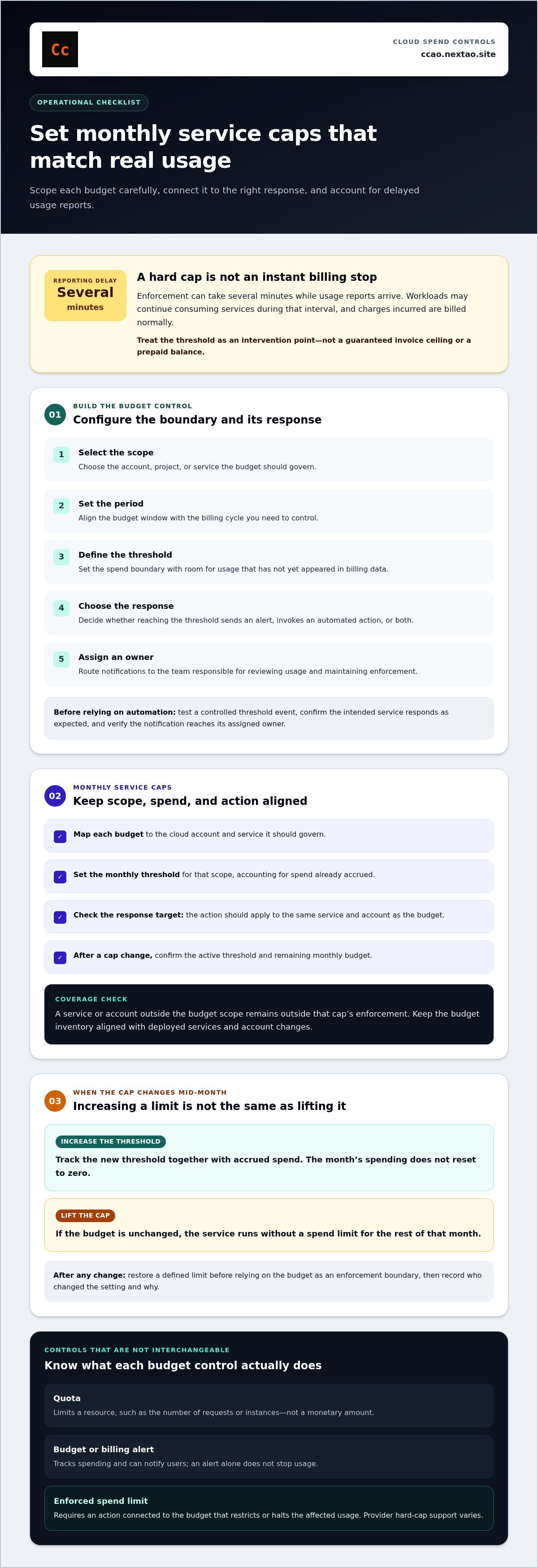
A hard cap is a spending boundary, not an instant stop to billing. Cloud hard cap enforcement can take several minutes while usage reports arrive, and charges incurred during that delay are still billed. If you lift a service cap without changing its budget, the service runs without a spend limit for the rest of the month.
Monthly limits provide a control point, but their effect depends on how the cloud platform reports usage and applies the cap. Configure separate limits for services that need containment, and account for reporting delays when setting thresholds. This article explains how to configure cloud spend caps, set monthly service limits, and understand the gap between reported spend and enforcement. It also covers what happens when you raise a cap mid-month, so you can assess the remaining budget and operational exposure.
Key Takeaways
- Set a budget threshold and define the action that should follow it; an alert alone does not stop usage.
- Scope monthly limits to individual services so one workload’s consumption does not obscure another’s.
- Design enforcement around incoming usage telemetry, and treat reported spend as a delayed signal rather than an instantaneous stop condition.
Cost reporting latency and potential overages
A spend cap is evaluated against reported usage, not necessarily at the moment a resource consumes it. Usage data must pass through the provider’s metering and reporting process, so enforcement can be delayed by several minutes. During that interval, workloads may continue consuming services before the cap controller receives data showing that the threshold has been crossed.
Costs incurred during the reporting delay are billed normally. The cap sets an intervention threshold; it does not erase charges already incurred or guarantee an exact billing ceiling.
That difference matters when setting a limit. A configured threshold and the final invoice reflect different stages of the usage pipeline. The threshold triggers an action after reported spend reaches it, while the invoice includes billable usage accumulated between consumption, reporting, and enforcement. Treat the cap as a control boundary subject to reporting delays, not as a prepaid balance that blocks every additional charge.
Workloads that remain active during this interval can generate additional billable usage. The amount depends on the rate of consumption and when the enforcement mechanism receives the usage report.
Reduce exposure by applying these operational steps:
- Set the threshold below the maximum spend your budget can tolerate.
- Identify workloads that can continue consuming resources while reports are delayed.
- Configure a separate notification path so the team can respond when usage approaches the threshold.
These controls limit the impact of delayed usage data. They do not change how providers bill usage recorded during the reporting delay.
Creating and configuring a spend cap budget
Hard-cap support varies by provider. Use a provider control only when it can restrict or stop the affected usage; a budget that only sends alerts does not enforce a spending limit. Check the control’s scope, such as account, project, service, or resource group.
A quota limits a resource, such as the number of requests or instances, rather than a monetary amount. A budget tracks spending and may trigger alerts or actions. A billing alert reports that a threshold has been reached but does not, by itself, stop usage. To enforce a limit, connect a budget threshold to an action that changes service access or capacity.
Configure the budget as an operational boundary:
- Select the scope. Choose the account, project, or service whose usage the budget should govern.
- Set the period. Align the budget window with the billing cycle you need to control.
- Define the threshold. Set the maximum spend the selected scope can tolerate, allowing room for usage that has not yet appeared in billing data.
- Choose the response. Specify whether the threshold sends an alert, invokes an automated action, or both.
- Assign an owner. Route notifications to the team responsible for reviewing usage and maintaining the enforcement configuration.
Keep the budget’s scope aligned with its response. An account-wide budget paired with a service-specific shutdown may leave other workloads unaffected, while a broad shutdown can interrupt unrelated workloads. Match the action to the resources generating the spend.
Before relying on automated intervention, test the configuration with a controlled threshold event. Confirm that the intended action runs, the affected service responds as expected, and the notification reaches its assigned owner. Record the response path alongside the budget settings. This makes later changes traceable and reduces uncertainty during an enforcement event.
Review the budget when service architecture or ownership changes. A new project, API, or billing scope may fall outside an existing control. Reconcile the budget’s scope with the deployed resource inventory, then update the enforcement action and notification route together.
Monthly service-specific spend caps
A monthly service cap applies to the service and account scope assigned to its budget. Limits do not automatically cover services or accounts outside that scope. Excluded usage means usage the configured budget does not include, rather than a universal list of cloud products or account types.
Set a separate cap for each service that needs an independent boundary. This isolates service-level spending and makes each limit easier to interpret. Before relying on a cap, inspect its account, project, and service scope. Confirm that the resources generating charges are included and that the enforcement action targets them.
Changing a cap mid-month means tracking both the new threshold and accrued spend. The new threshold does not reset the month’s spending to zero. Count accrued usage as part of the same monthly allocation.
Lifting a cap differs from increasing it. If you lift a spend cap without changing the budget, the applicable service runs without a spend limit for the rest of that month. Restore a defined limit before relying on the budget as an enforcement boundary. Record who changed the setting and why, so the team managing the service can see the temporary change.
Use this review sequence when configuring monthly service caps:
- Map each budget to the cloud account and service it should govern.
- Set the monthly threshold for that scope, accounting for spend already accrued.
- Check whether the response action applies to the same service and account.
- After any cap change, confirm the active threshold and remaining monthly budget.
This scope-based approach reveals coverage gaps before they cause operational surprises. A service outside the selected budget, or an account omitted from its scope, remains outside that cap’s enforcement. Keep the budget inventory aligned with deployed services and account changes.
Near-real-time cap enforcement
Budget alerts notify users when reported spending reaches a configured threshold. They stop services only if an automated action is separately configured to restrict or halt the affected usage. A notification and an enforcement action are distinct controls, even when one budget triggers both.
A cloud hard-cap enforcement path depends on three components: a spend signal, a threshold condition, and an action. The signal supplies reported usage. The condition compares that usage with the configured limit. The action then changes access or capacity for the resources in scope. A delay in any component delays the full response.
Test the control in an isolated cloud project before applying it to production. Use a disposable workload and a threshold that tests the intended trigger without involving critical services. Confirm the following sequence:
- Generate controlled usage within the test project.
- Confirm the budget registers that usage and evaluates its threshold.
- Verify the configured action targets the intended service or resource.
- Check that the service responds to the action and the notification reaches its assigned team.
- Restore the test configuration and document the result.
Do not treat a delivered alert as proof that enforcement worked. Compare the alert event with the action record and the affected resource’s state. If the alert arrives but the service remains active, check whether the budget has an automated response, whether the target matches the budget scope, and whether the response has the required permissions.
Keep production verification controlled. Use a noncritical service during a planned test window, then monitor the budget event, automation output, and resource state together. Avoid testing by exhausting a production budget: reported usage can continue to accrue before the control acts. Record the tested threshold, scope, action, and outcome for repeatable review.
For teams that need scheduled spend tracking and automated breach prevention, review automated cloud spend controls as part of the enforcement design.
CCAO by NEXTAO: Cloud & API Budget Circuit Breaker
CCAO by NEXTAO provides the Cloud & API Budget Circuit Breaker for scheduled cloud and API spend monitoring and hard-cap enforcement. It combines automated spend tracking with breach prevention, anomaly alerts, and team notifications. Use it when you need a structured control layer to track usage and respond to budget thresholds across cloud and API spending.
Cap enforcement still depends on the timing of usage reporting. Treat alerts and automated intervention as controls within that reporting pipeline, not as a guarantee that billing stops at an exact threshold. The service also uses an isolated data engine, granular IAM permissions, and server-side AES-256-GCM encryption.
To assess whether this circuit breaker fits your spend-control workflow, contact CCAO by NEXTAO or visit ccao.nextao.site.
Make spend controls part of service ownership
Treat spending limits as part of service ownership, not as isolated billing settings. Assign responsibility for approving threshold changes, reviewing exceptions, and restoring controls after temporary adjustments. Define the change process before workloads or priorities shift. This gives each team clear accountability and preserves a record of who changed a boundary and why.
Use this ownership model to assess whether your cloud hard cap enforcement design fits the way teams deploy and operate services. If budget signals, automated actions, and change records sit in separate workflows, make the handoff explicit before expanding usage. CCAO by NEXTAO offers the Cloud & API Budget Circuit Breaker for scheduled cloud and API spend monitoring and hard-cap enforcement.
Start with a focused review of your spend-control workflow. Contact CCAO by NEXTAO to discuss the next step. A clear control path is a practical foundation for predictable cloud operations.
Frequently Asked Questions
How do spend caps work?
A spend cap compares tracked charges with a configured budget and triggers the response attached to that threshold. For example, a team can scope a budget to one project and route its threshold event to an automation that restricts the project’s usage. The result depends on the selected scope and action. Review both whenever project ownership or deployment structure changes.
How am I billed during a spend cap?
Usage that becomes billable remains chargeable even if a cap later restricts the service. The cap controls future activity through its configured response; it does not reverse charges already recorded. To reconcile an invoice, compare billing records with the budget’s usage data and the enforcement event. This distinguishes accrued consumption from later activity prevented by the control.
What happens to my in-flight requests?
Requests already accepted when an enforcement action runs may complete or fail, depending on the service and action. A control that blocks new requests may not cancel work already underway. For example, a queued job may behave differently from a new API call. Include active requests, queues, retries, and dependent services in your test plan before applying shutdown behavior.
Will my resources or data be deleted when a cap triggers?
A cap trigger does not inherently delete resources; the configured action determines the operational effect. Shutting down a service or restricting access is different from deleting resources. Design the response to preserve required state, and inspect its scope before enabling it. Test with noncritical resources, then confirm that storage and recovery procedures remain separate from the spending control.
What does cloud hard cap enforcement mean?
Cloud hard cap enforcement is an automated control that applies a defined action when tracked spending reaches a configured threshold. The action may restrict the resources or access generating charges, rather than merely notify a user. Its practical limits depend on the budget’s scope, the usage data feeding it, and the response configured for that threshold.
How can I configure automatic cloud resource shutdown at a spending threshold?
First, select the account, project, or service to govern. Set a budget threshold, then connect it to an automation with permission to stop or restrict the intended resources. Limit the action’s scope to avoid affecting unrelated workloads. Test the full sequence in an isolated environment, including permissions, notifications, and restart procedures, before enabling it for production resources.
